<< Previous Slide Next Slide >>
|
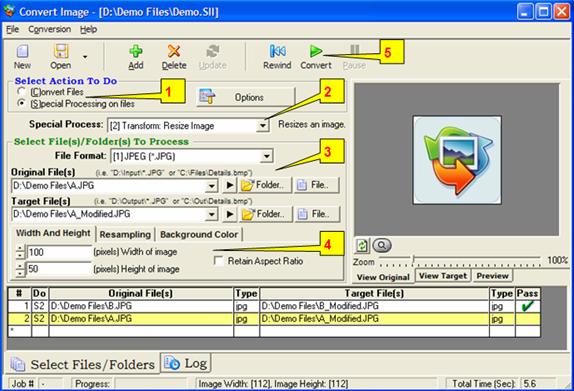
Special ProcessesSpecial Processing on Files enables you to modify images in a variety of ways, and also allows you to launch a program from within ‘Convert Image'. To do so: 1) First select the “Special Processing On Files” as the action to do 2) Select the special process you want to perform in the “Special Process” list box. Here you specify if you want to resize, rotate an image etc. 3) For manipulating images, you should then specify the file type, the original (input) file and target (output) file. 4) Depending on the Special Process, additional options can be configured. The Preview tab can give you a glimpse of what it will look like after the conversion. 5) Click the Add button then press the Convert button if you are ready to begin the conversion job. Repeat steps 1-4 as many times as necessary to create a sophisticated ‘Conversion Job’. Conversion jobs can be saved, restored, and edited; they may also be specified and run from the command line.
Back To 'Convert Image' Home page
See online videos of 'Convert Image', click here.
|